Vivollo
Changelog

What's new in Vivollo

Every release, improvement and fix — what shipped, when, and why it matters.

Subscribe via RSS
New

Conversation Intelligence: understand what every customer is really asking

Insights now classifies every conversation across the dimensions that matter, lets you drill into any segment, and turns recurring blind spots into knowledge-base drafts.
Conversation Intelligence: understand what every customer is really asking

Volume charts tell you how much. Conversation Intelligence tells you what about — and what to do next. Every conversation is now auto-classified across request type, topic, sentiment, language, churn risk and customer effort, so the patterns surface on their own.

Drill into any segment

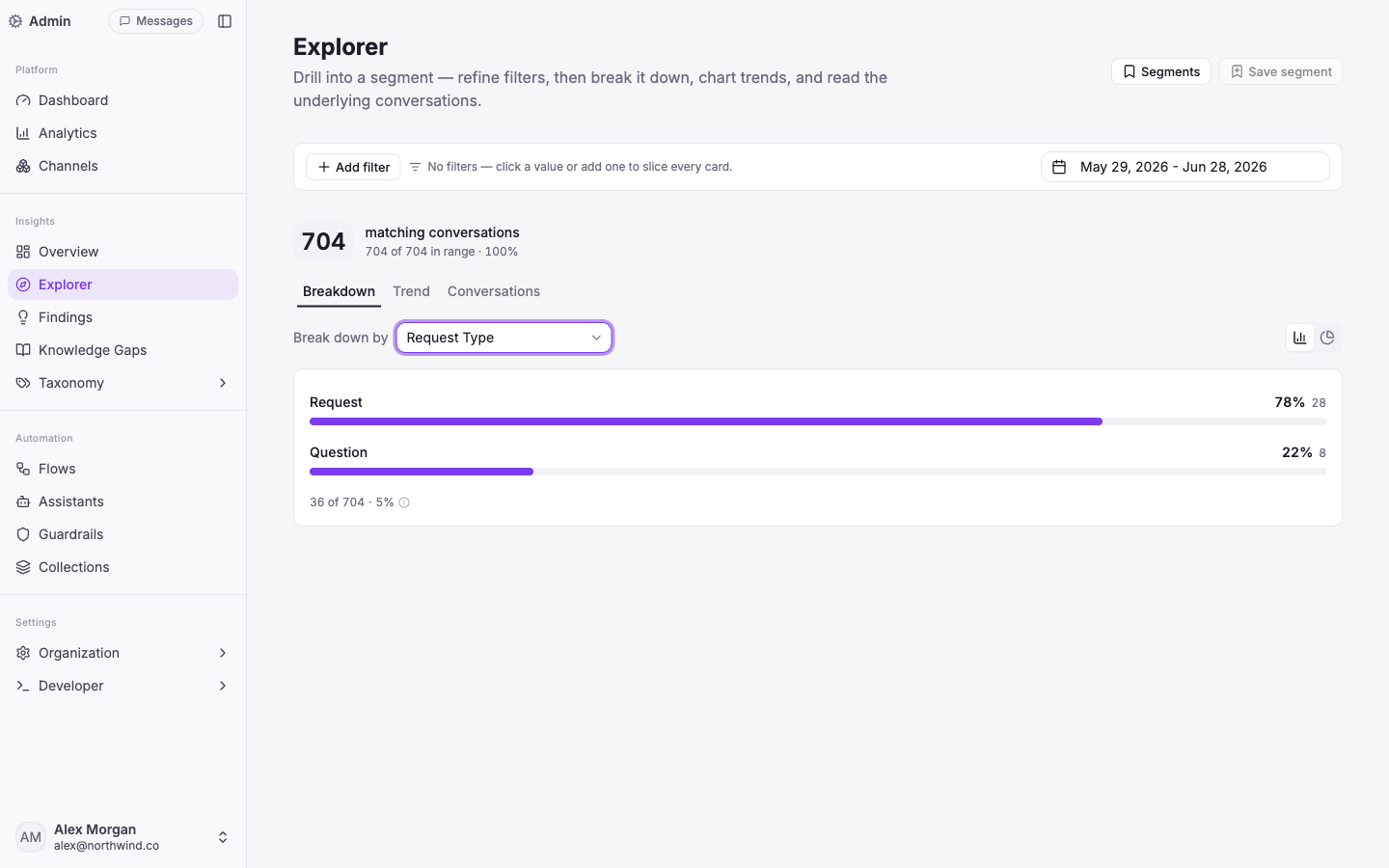
Start from a number and follow it down. Explorer lets you break any segment down by a dimension, chart how it trends, and read the actual conversations behind it — then save the segment to come back to it.
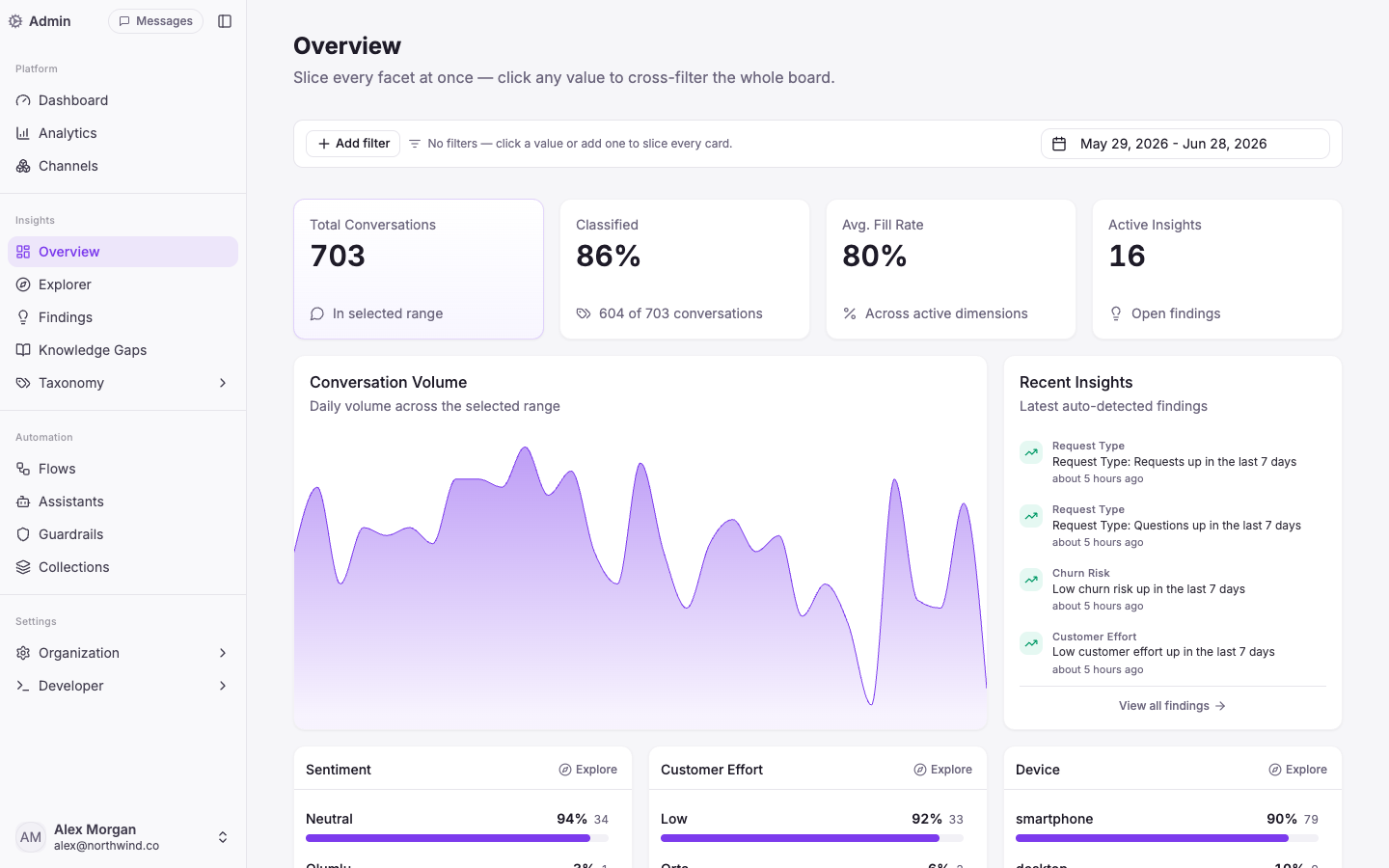
Insights overview with auto-classified conversation dimensions and recent findings
Overview · slice every facet at once; Recent Insights flags shifts before you go looking.

The Overview board lays out every facet at once — click any value and the whole board cross-filters to it. Findings runs in the background and surfaces trends, shifts and correlations automatically, so a spike in "Issue" or a drop in sentiment reaches you without a manual query.

Close the loop on what you don't know

When the assistant repeatedly can't answer something well, that's a Knowledge Gap — ranked by how many conversations it touches. One click drafts a knowledge-base article from the real examples, ready for you to review and publish. Your assistant gets measurably better from its own blind spots.
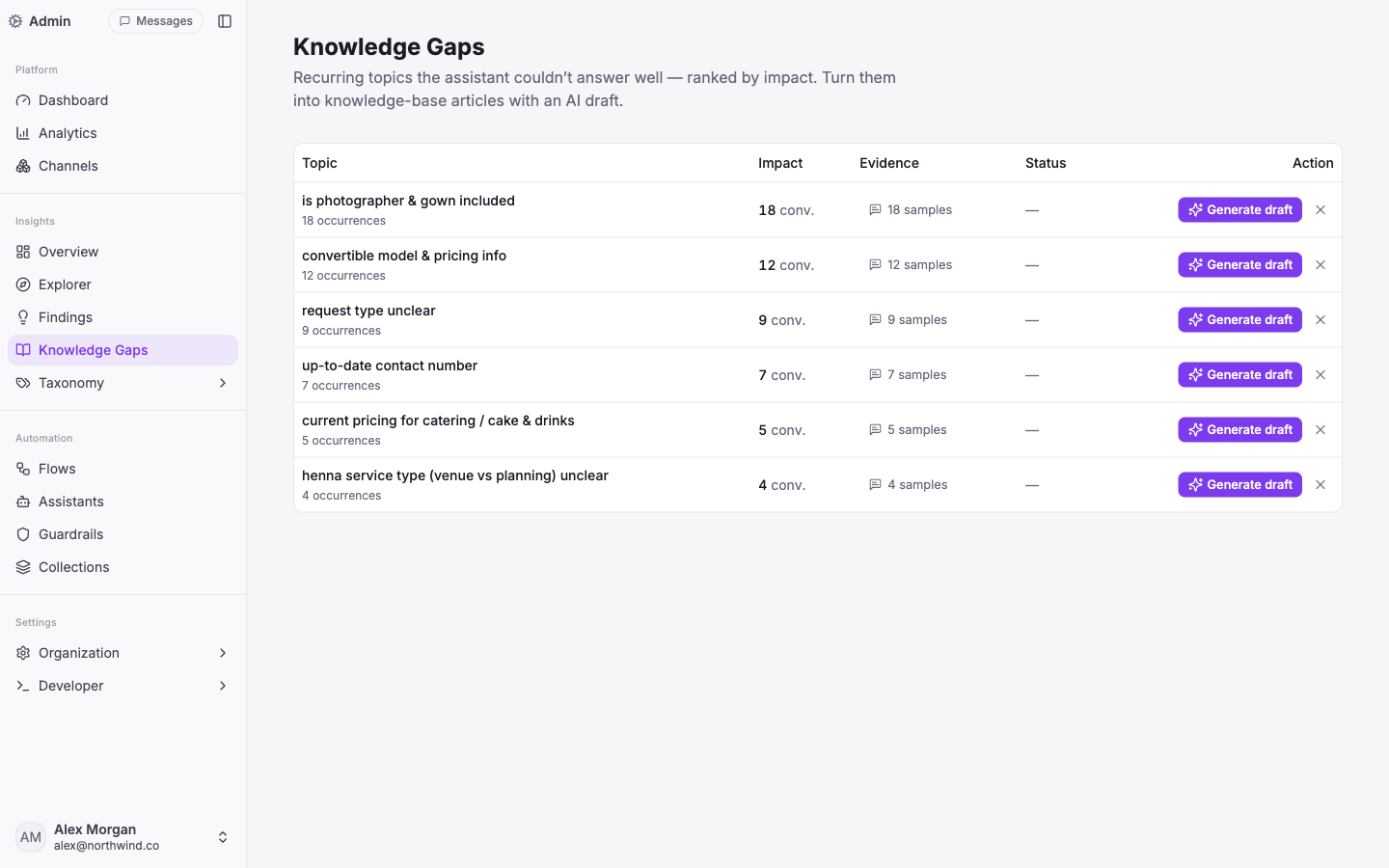
Knowledge Gaps ranked by impact with one-click AI draft generation
Knowledge Gaps · recurring unanswered topics, ranked by impact, one click to an AI draft.

It all runs in your workspace language — the AI's output and the built-in dimension labels are localised per tenant.

This is the difference between a dashboard you glance at and an analytics layer that actually changes what your agent knows.
New

Commerce, deeper: WooCommerce, live catalog and precise filtering

WooCommerce joins Shopify, Ticimax and Trendyol — with live catalog and order actions — and the agent can now filter your catalog by what matters, not just keywords.

WooCommerce is now a first-class integration, alongside Shopify, Ticimax and Trendyol. The agent works from your live catalog — real products, prices and stock — and can handle order status, cancellations and refunds, verifying the customer by email and order number first.

Search that narrows, not just matches

Your catalog is more than a wall of text. The agent can now filter results by typed fields — variant/SKU, price, capacity, location, budget — so "a venue in Chicago under $2,000 for 150 guests" returns the right options instead of a keyword soup. Vertical templates (retail, listings, services) shape each catalog to its domain.

The result: product answers that feel like a knowledgeable salesperson — grounded in what you actually have in stock.

New

Vision: the agent can see customer photos

When a customer sends a photo, the agent actually looks at it — so 'do you have this?' or a snapshot of the problem just works.

Customers don't always have the words — sometimes it's easier to show you. Now when someone sends a photo, Vivollo passes the image to the model so the agent can see it and respond to what's actually there.

Show, don't tell

A shopper sends a picture and asks "do you have this one?"; someone photographs a damaged item, or a screenshot of an error. The agent reads the image in context — alongside the rest of the conversation — and answers, recommends or routes accordingly. Recent images in the thread come along too, so follow-up questions still make sense.

Part of the same agent

Vision plugs into the same agentic loop as everything else, so a photo can kick off the same next steps as a typed message — catalog search, an order lookup, or a handoff to your team.

Fewer "can you describe it?" round-trips; faster resolutions.

New

Guardrails: keep every answer safe, on-brand and on-topic

Layered safety checks on what comes in and what goes out — pattern, PII redaction, prompt-injection and LLM-based — so your agent stays compliant and on-message.

Guardrails: keep every answer safe, on-brand and on-topic

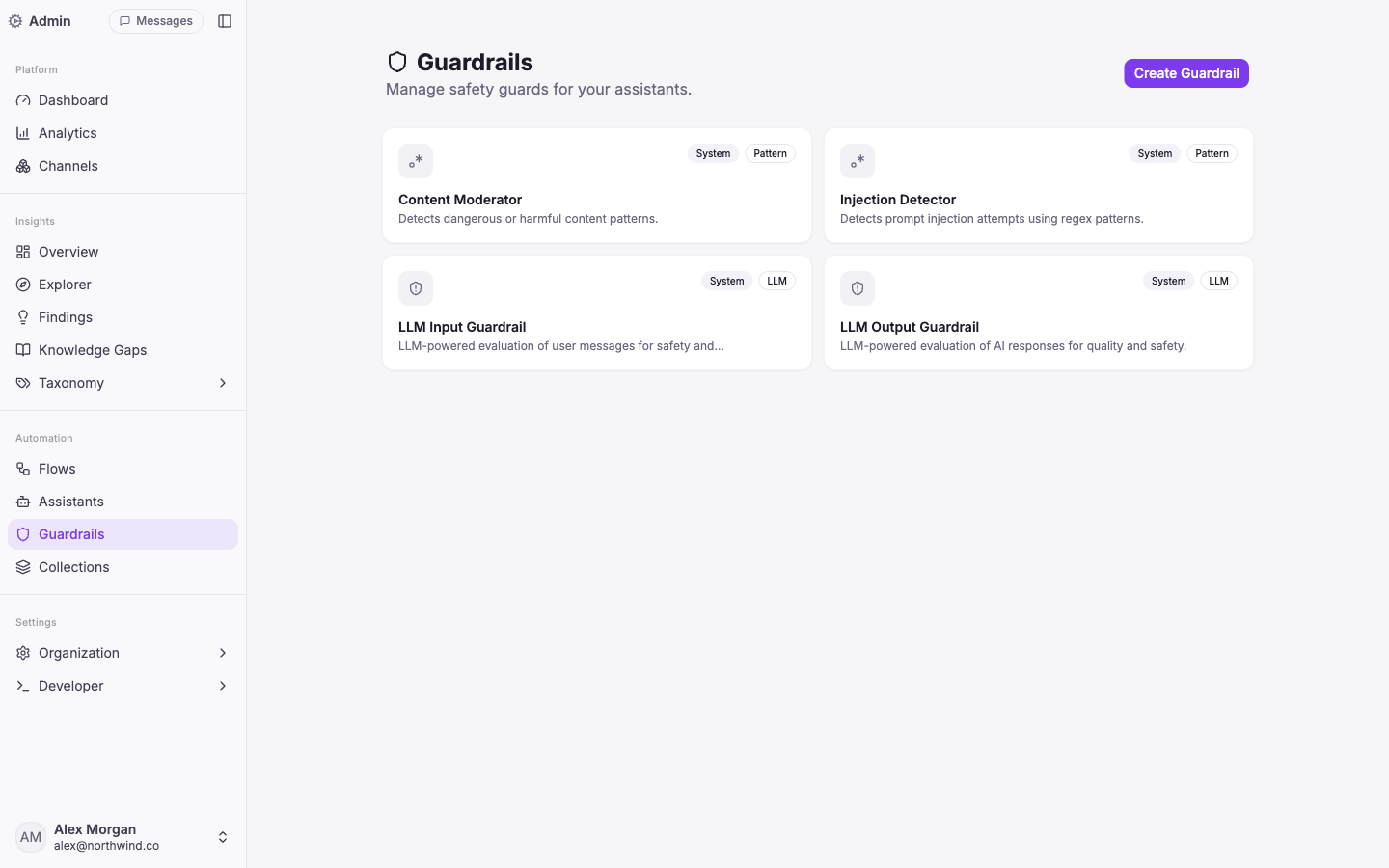
Letting an AI talk to your customers means setting boundaries it can't cross. Guardrails run on both sides of every turn — the customer's message on the way in, and the agent's reply on the way out.

Layered protection

  • Pattern — catch dangerous or unwanted content with regex rules.
  • PII redaction — detect and mask emails, phone numbers, cards, national IDs (incl. TC Kimlik), IBANs and more, so sensitive data never lands in your logs (KVKK / GDPR).
  • Prompt-injection detection — spot attempts to hijack the agent's instructions.
  • LLM-based — judge tone, safety and quality against your own rules, and route off-topic messages away.

Checks are streaming-safe, so nothing slips through while a reply is still being typed out.

On by default, yours to extend

Vivollo ships with system guardrails — content moderation, injection detection, and LLM evaluation of both user messages and AI responses — and you can add your own per assistant.

The point: an AI you can put in front of customers without holding your breath.

New

Live handoff: pass the conversation to a human — with the full story

When a moment needs a person, the agent escalates and your teammate picks up with the entire context already in hand — history, memory, customer and journey.

The agent now knows when to step back. Mid-conversation it can trigger a handoff with a written reason, and the conversation moves into your team's inbox — with no cold restart for the customer.

The human picks up where the AI left off

Whoever takes over sees the whole story: the full message history, what the agent remembered about the customer, who the visitor is, and the journey that brought them here. They reply in the same thread — nothing is lost in the handover.

Automation can resume

Once the person is done, the agent can take the conversation back and carry on. And if you run support through Connexease, a handoff can assign the conversation to the right agent or group there, with two-way sync.

Routine stays automated; the moments that need a person get one — seamlessly.

New

Auto-translate: reply in every customer's language

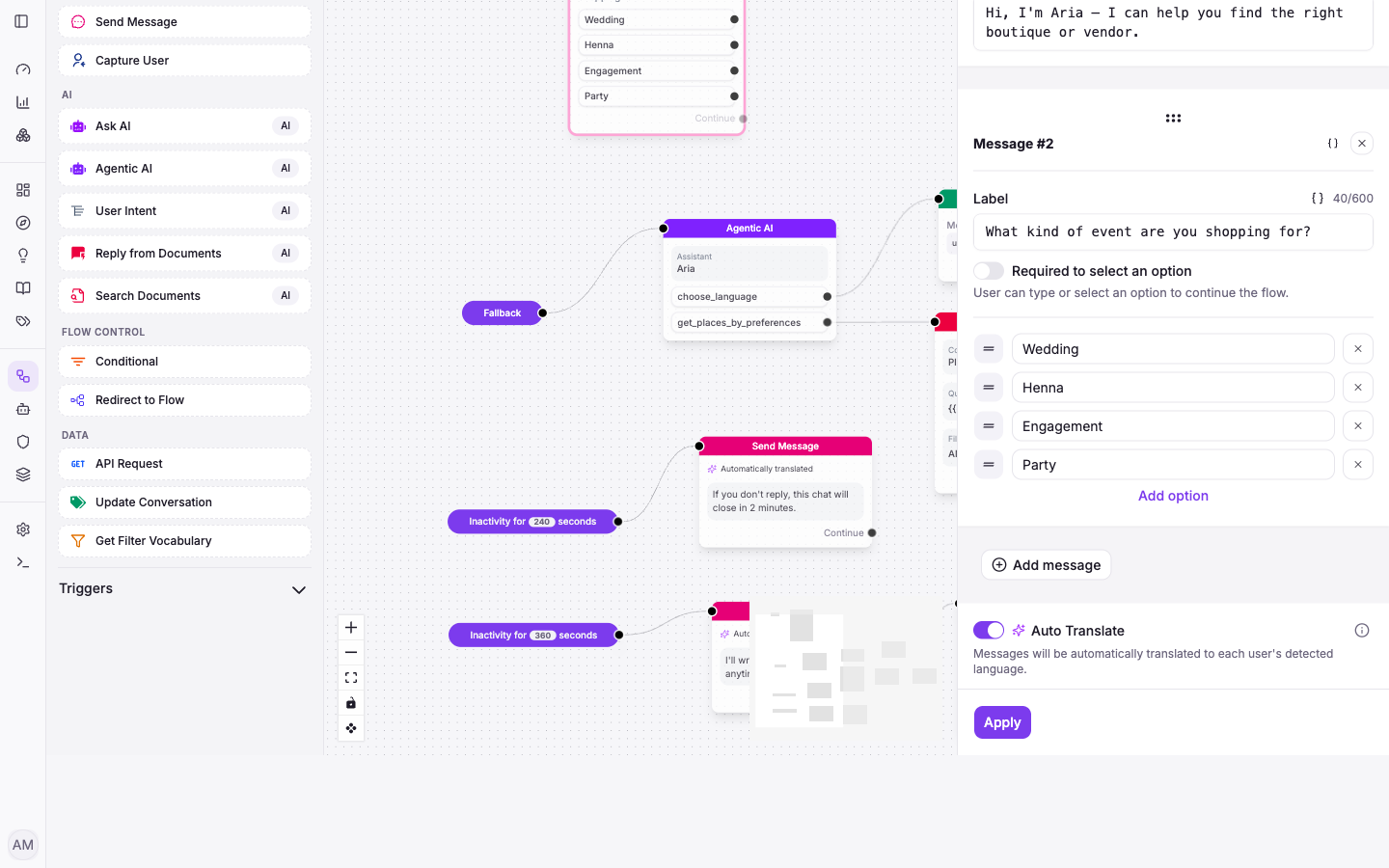
Flip one switch on a Send Message step and your agent detects each visitor's language and answers in it — no separate flows per market.

Auto-translate: reply in every customer's language

Selling across borders shouldn't mean building a separate flow for every language. Auto Translate detects the language a visitor is writing in and translates your agent's replies into it automatically.

One toggle, on any message

It's a switch on the Send Message step. Turn it on and that message — and the agent's responses around it — go out in each visitor's detected language, while you author everything once in your own. Turn it off and messages send exactly as written.

That means a single flow serves a customer in English, the next in German, and the next in Turkish — each in their own words, with no extra setup. The visitor's language is detected from their own messages, so there's nothing for them to pick.

v1.0
New

Meet Vivollo: one agentic AI for every customer conversation

Where it all begins — an agentic assistant that holds real conversations across your channels, acts with tools, and is composed on a visual canvas. No code required.

Meet Vivollo: one agentic AI for every customer conversation

This is the start of the Vivollo changelog — where we'll log every release, improvement and fix from here on. To kick it off, here's the platform we set out to build: an agentic AI for customer support and sales that does more than answer — it acts.

One inbox, every channel

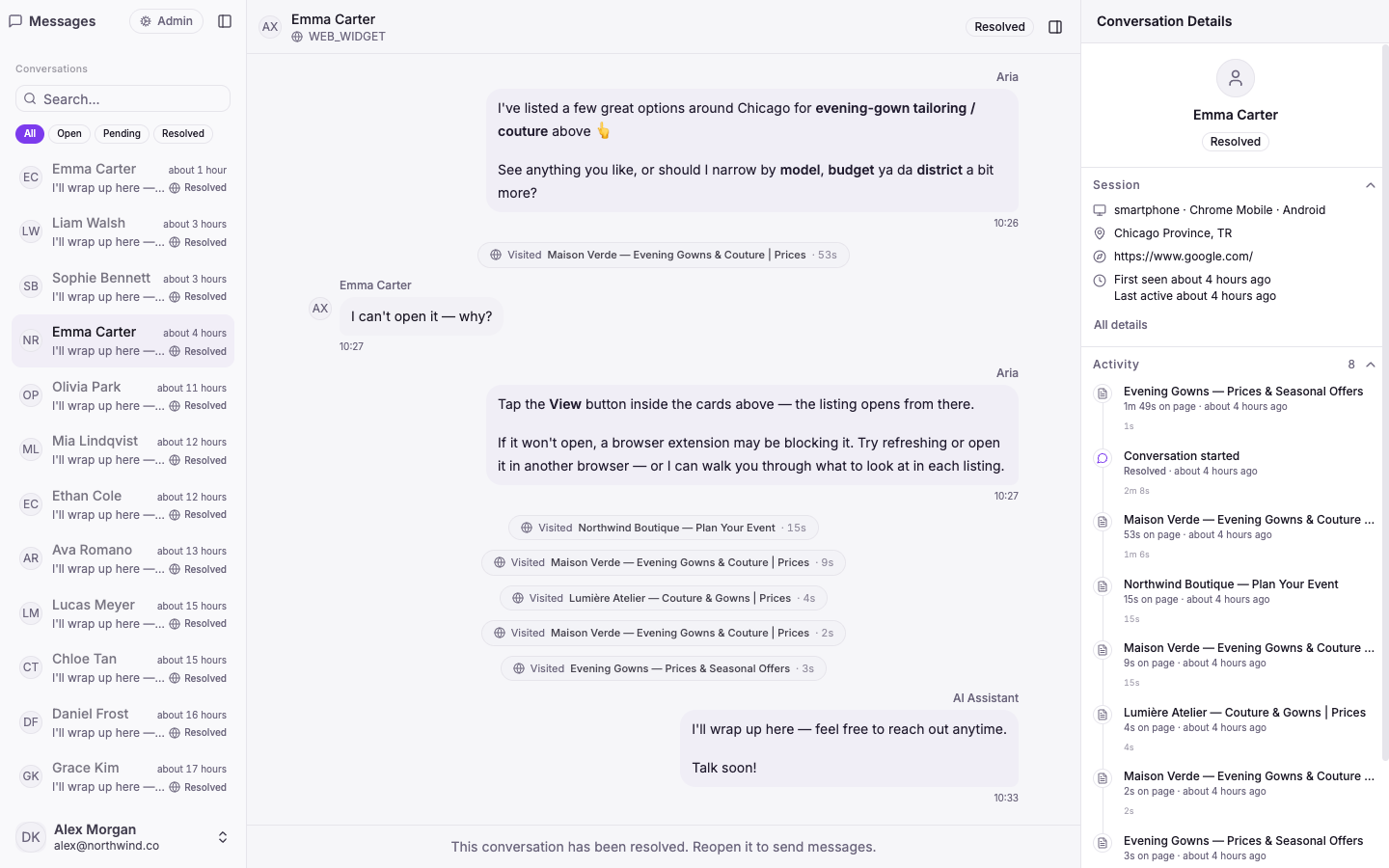
Your whole team works from a single, shared inbox. Conversations from your website widget and WhatsApp land in one place, and each one carries the full picture — who the visitor is, where they came from, what they've browsed, and every step the agent took.

The screenshot above shows a live shopping chat: the assistant surfaces product cards, narrows by budget and location, then closes out cleanly — with the visitor's session and journey on the right.

An agent that acts, not just chats

Vivollo runs a real agentic loop: mid-conversation it can search your catalog, look things up, read your documents, remember the customer across visits, and take the next step — instead of replying from a fixed script. It answers in your customer's words and keeps context the whole way through.

Build automations visually

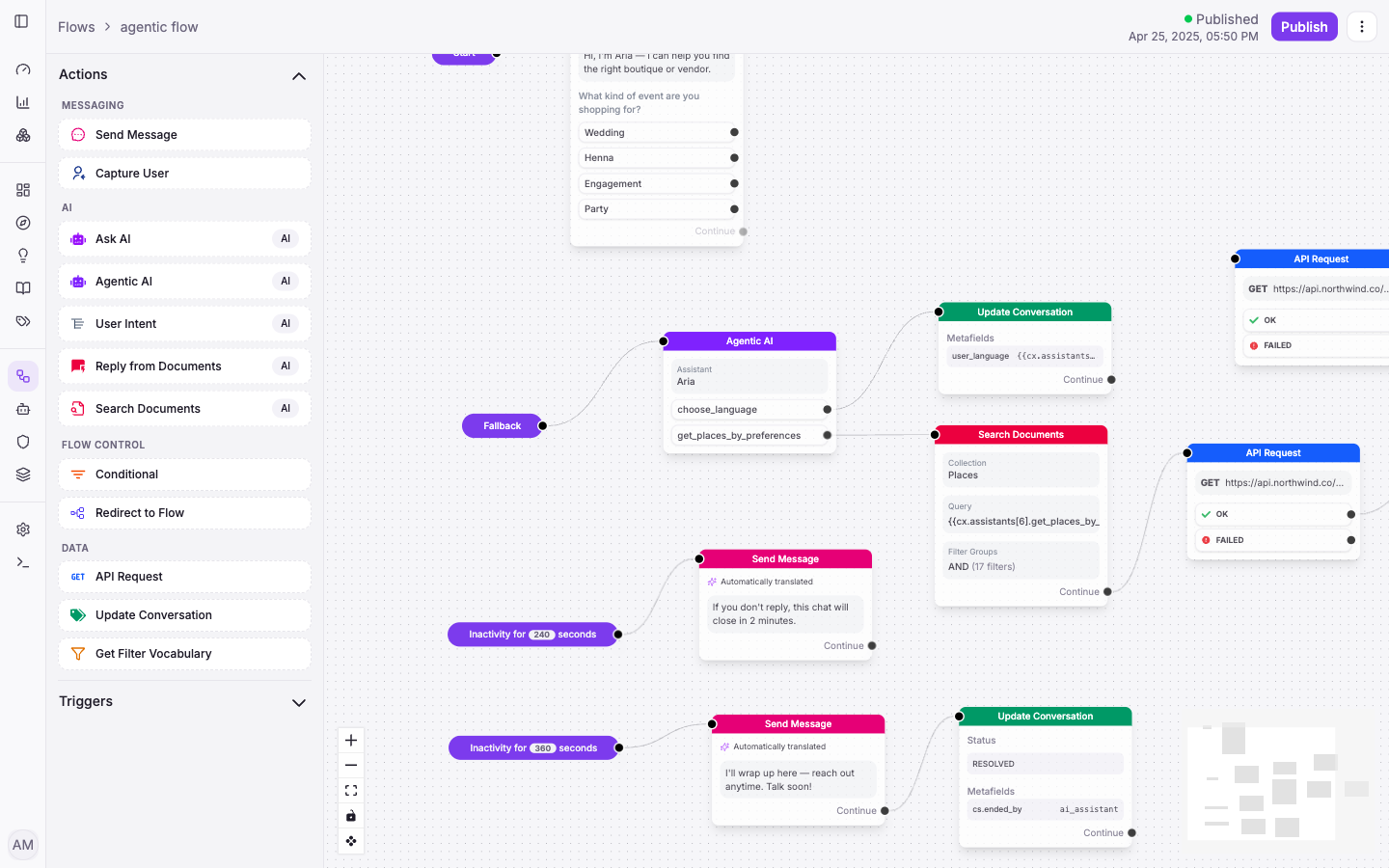
The flow builder is a drag-and-drop canvas for designing exactly how your agent behaves — send messages, capture details, call your APIs, search documents, ask the AI, branch on conditions. No code required.

Vivollo visual flow builder canvas with connected nodes
Flows · compose agent behaviour on a visual canvas — messaging, AI, data and flow control.

Answers grounded in your truth

Point Vivollo at your website, docs and catalog and it answers from your content — with hybrid search over a vector store — so replies are accurate and sourced, not made up.

Know your numbers

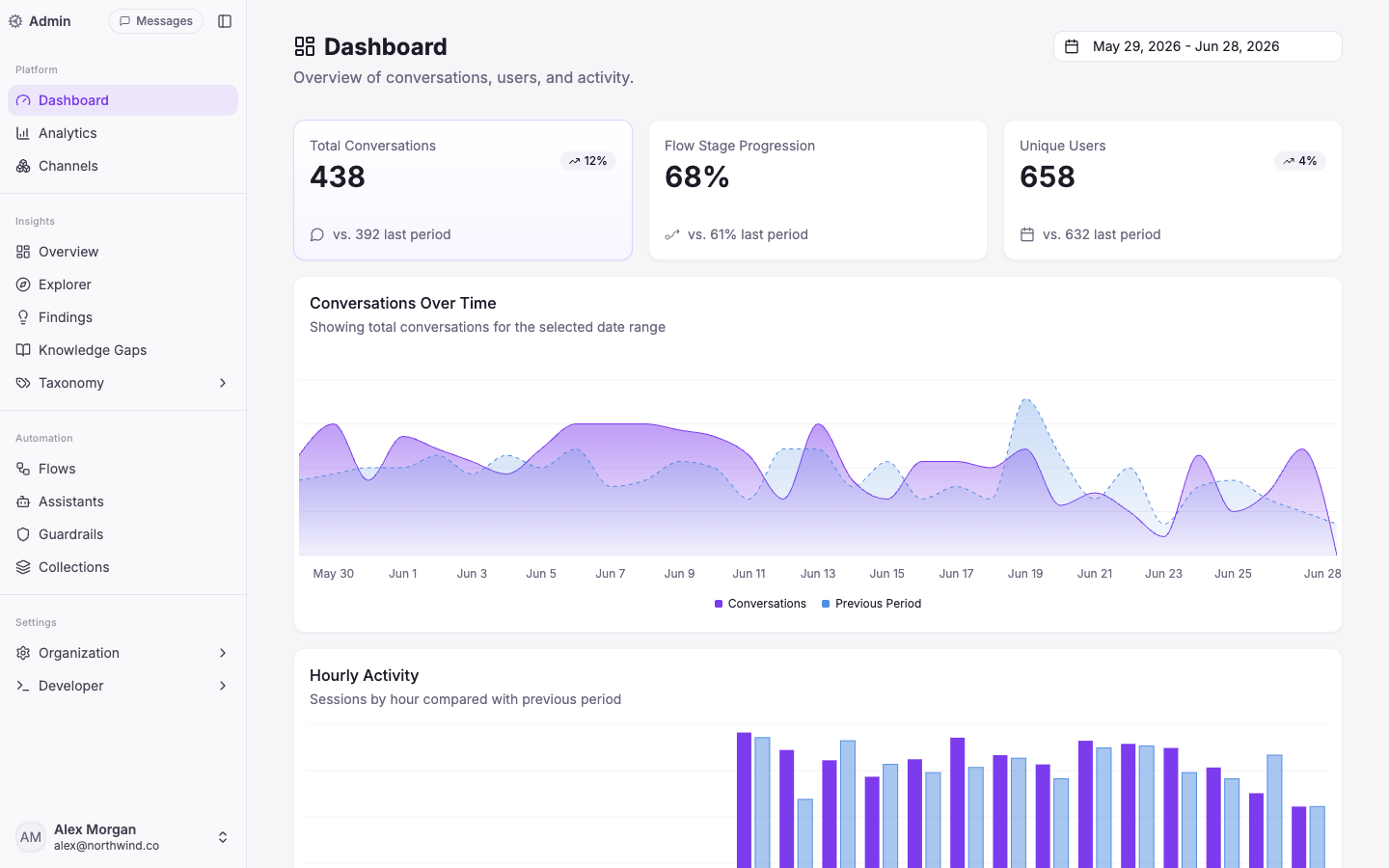
A dashboard tracks conversations and unique users over time, so you can see the impact at a glance.

Vivollo dashboard with conversation volume and activity charts
Dashboard · conversation volume, users and activity over time.

The building blocks

  • Channels — connect a web widget and WhatsApp, each wired to its own flow.
  • Assistants — define agents with their own role, instructions and knowledge.
  • Collections — organise the documents and catalog your agent answers from.

This is day one. Everything above in the timeline is what came next.